Skip to content

Time tracking & time cards

Time tracking your team won’t forget to do

A timer that follows you around the app, weekly timesheets, clock-in time cards with breaks and overtime, and one-click approvals — all on the same tasks, accounts and deals you bill.

capabilities you switch on separately, from timers to PTO
5
capabilities you switch on separately, from timers to PTO
pay period options, from weekly to monthly
4
pay period options, from weekly to monthly
payroll export from locked pay periods
CSV
payroll export from locked pay periods

Timer & Pomodoro

Start a timer from anywhere. It keeps running.

Track Time sits in the top bar — type what you’re working on or restart something recent. Start it from a task, account or deal and the time lands in the right place. Forgot to stop it? WorkPro asks.

  • Built-in Pomodoro rounds with interruption logging
  • “Did you forget to stop it?” — keep, discard or correct
  • Completing a billable task with no time prompts for hours worked
  • Time links to tasks, accounts, deals and projects
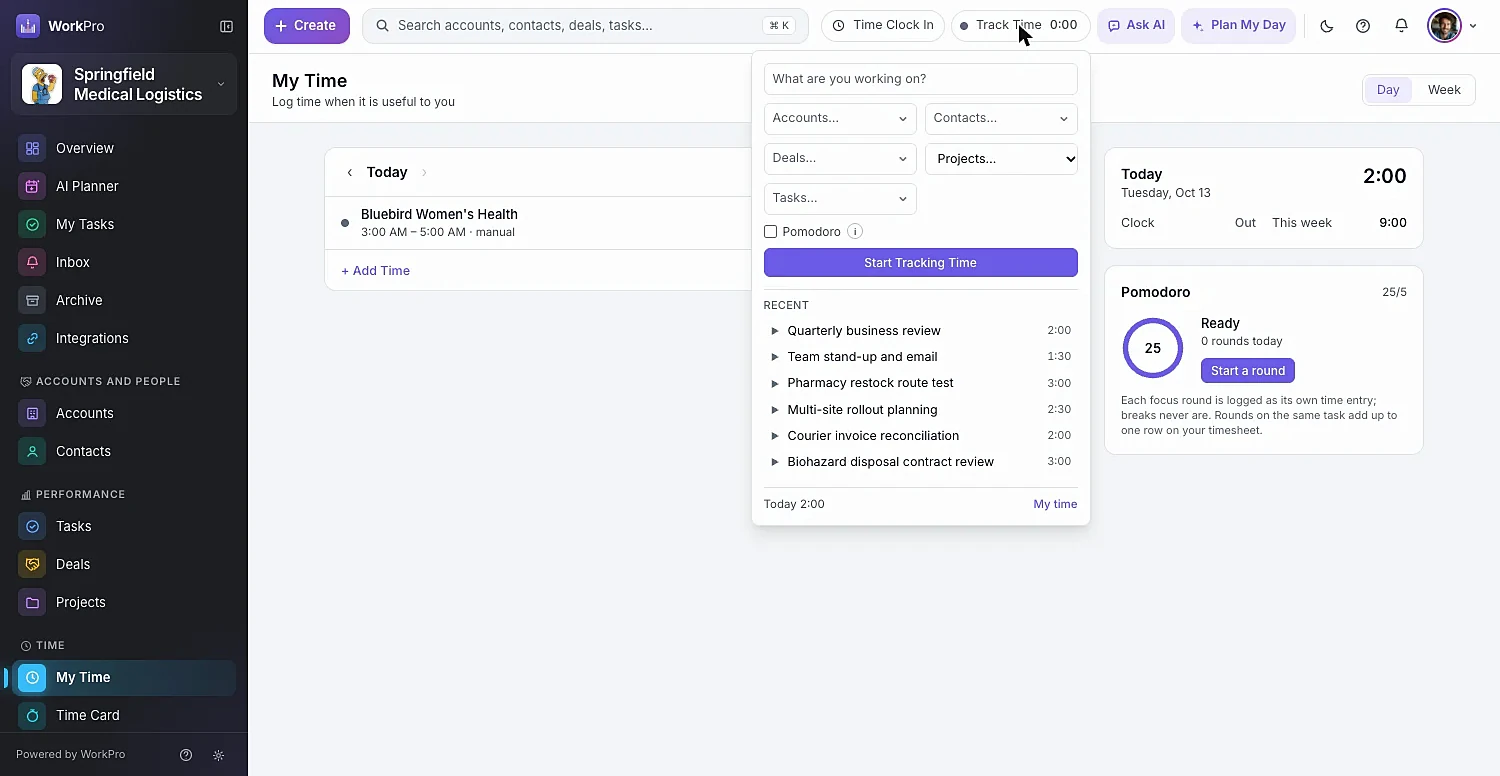
The WorkPro timer menu with recent work and Pomodoro

Timesheets

A weekly timesheet that fills itself in

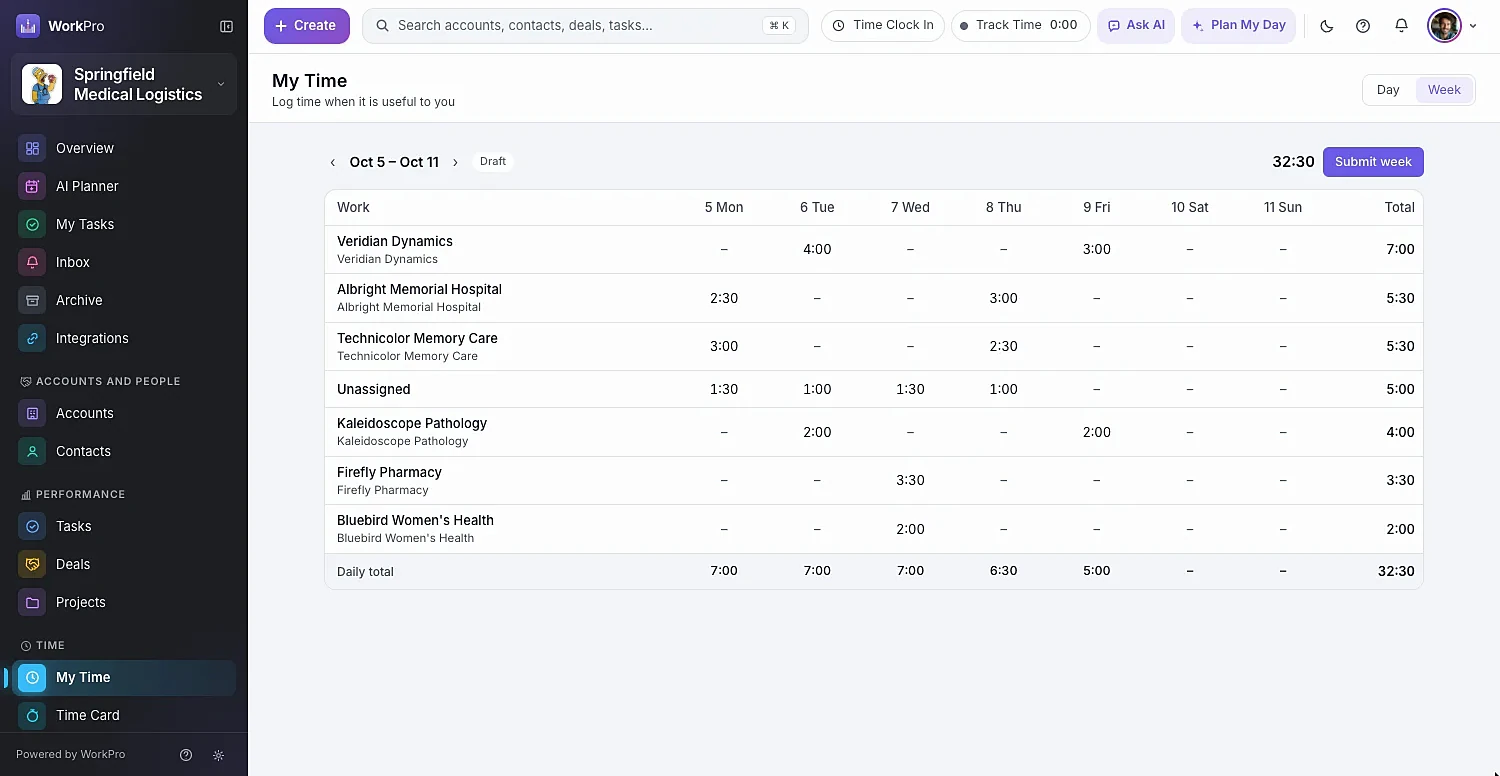
My Time shows a Day view and a Week grid where you type hours straight into a cell. Add time as a total or a start and end, create a task on the spot, and submit the week for approval when it’s done.

  • Day and Week views of everything you tracked
  • + Add Time with “What did you get done?” notes
  • Billable and non-billable hours side by side
  • Submit week sends it straight to your manager
The WorkPro weekly timesheet grid

Time cards

Clock in, take a break, clock out

Hourly teams clock in and out from the top bar, with labeled breaks. Time cards total regular, overtime, double time and paid leave for the period, and a missed punch is a quick request rather than an email thread.

  • On the Clock and On Break status in the top bar
  • Report a Missing Punch with a reason
  • Record leave — vacation, sick and your own leave types
  • Overtime rules and pay profiles for exempt and non-exempt staff

Approvals & payroll

Approve the week in minutes, then export payroll

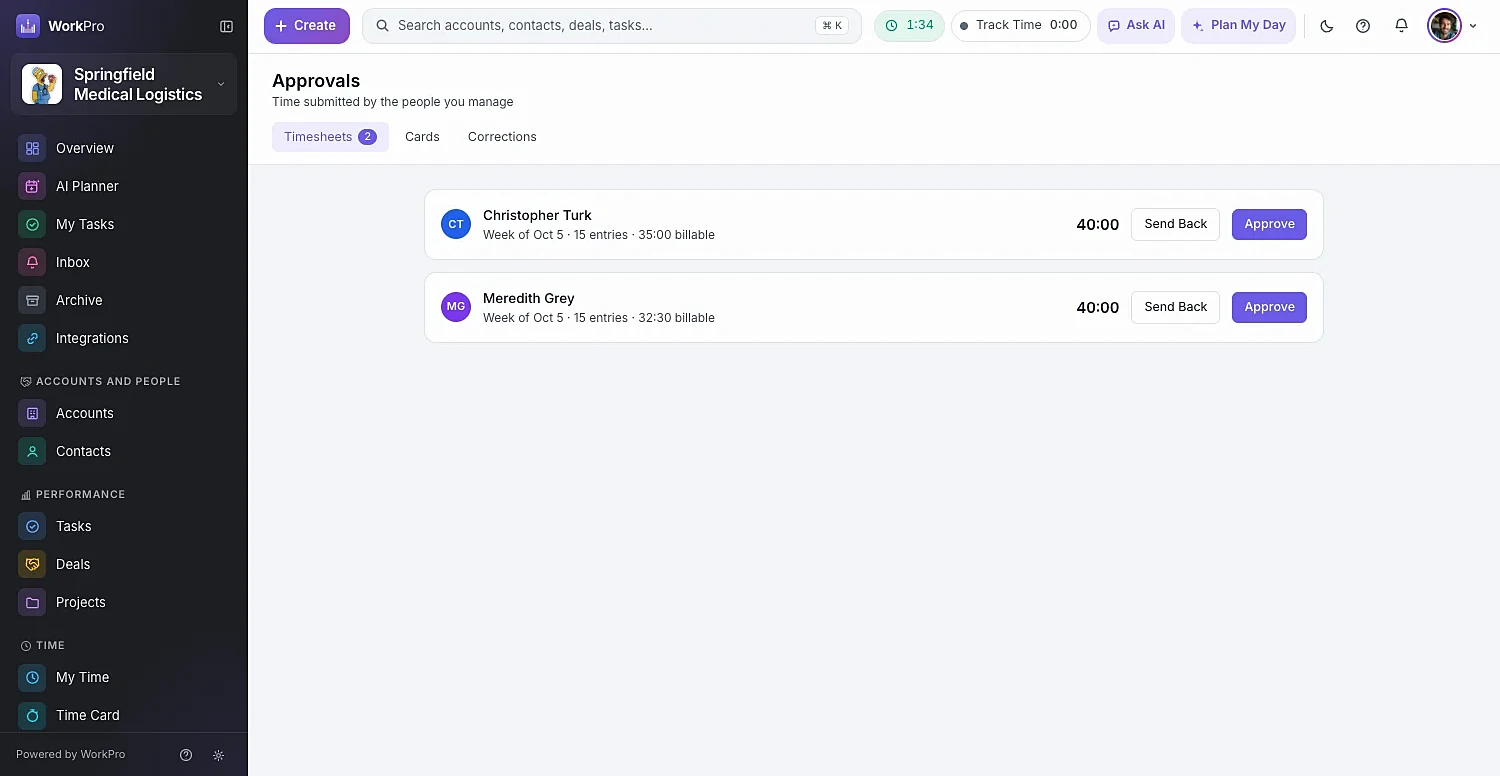
Managers see a badge when timesheets, time cards or corrections are waiting. Approve or send back with a note, then lock the period and export a payroll CSV. Need to fix something? Reopen the period.

  • Timesheets show total, entries and billable hours
  • Time cards flagged when they need attention
  • Missed-punch corrections to approve or reject
  • Lock period, Export payroll CSV, Reopen period
Manager approvals of submitted timesheets in WorkPro

Capabilities

Set the policy once. WorkPro keeps everyone on it.

Make the timer or clock available, encouraged or required — per role or per person.

  • Enforcement

    Off, warn with a banner, or block selected actions — like “no changes until you clock in”.

  • Pay periods

    Weekly, every two weeks, twice a month or monthly.

  • Rounding

    Round time entries consistently across the team.

  • Pay profiles

    Exempt or non-exempt, hourly or salaried, rate and manager.

  • Overtime & double time

    Overtime rules calculated on every time card.

  • Leave types

    PTO and leave tracked alongside worked hours.

  • Straight to invoices

    Approved billable time flows into Ready to Invoice.

  • Where the time went

    Hours by person and where the time went in Reporting.

  • Clock in from your phone

    The same top-bar clock works in any phone browser.

Better together

It all runs on the same records

Every WorkPro module shares your accounts, contacts and deals — so the work flows from one to the next.

FAQ

Time Tracking questions

Straight answers about what WorkPro does today. Can’t find yours? Ask us during a demo.

Can WorkPro replace a separate time clock app?

For many teams, yes. Time Cards let people clock in and out with labeled breaks, report missed punches and record leave. Periods total regular, overtime, double time and paid leave, managers approve them, and you can lock the period and export a payroll CSV.

Can I require people to track time?

Yes. Set the timer or clock to Available, Encouraged or Required per role or per person, and choose whether WorkPro should do nothing, warn with a banner, or block selected actions until someone clocks in.

Does tracked time turn into invoices?

Yes. With Invoicing & Billing on, completed billable time collects in Ready to Invoice, where you can create draft invoices for many accounts at once.

Does WorkPro have a Pomodoro timer?

Yes. Pomodoro rounds are built in, with configurable round and break lengths, interruption logging and a count of today’s rounds.

Can I turn on only some time-tracking features?

Yes. Time Entries, Pomodoro, Time Cards, PTO and Leave, and Billable Time are switched on separately in Time Tracking settings.

Run your whole business from one app

See WorkPro with your own pipeline, projects and invoices in a 30-minute walkthrough. We’ll help you import your data, too.