Skip to content

Field sales & route planning

Plan the day’s visits in one click — briefings included

WorkPro picks the accounts that need you most, orders them into a timed driving route around your calendar, and writes talking points for every stop from the account’s own history.

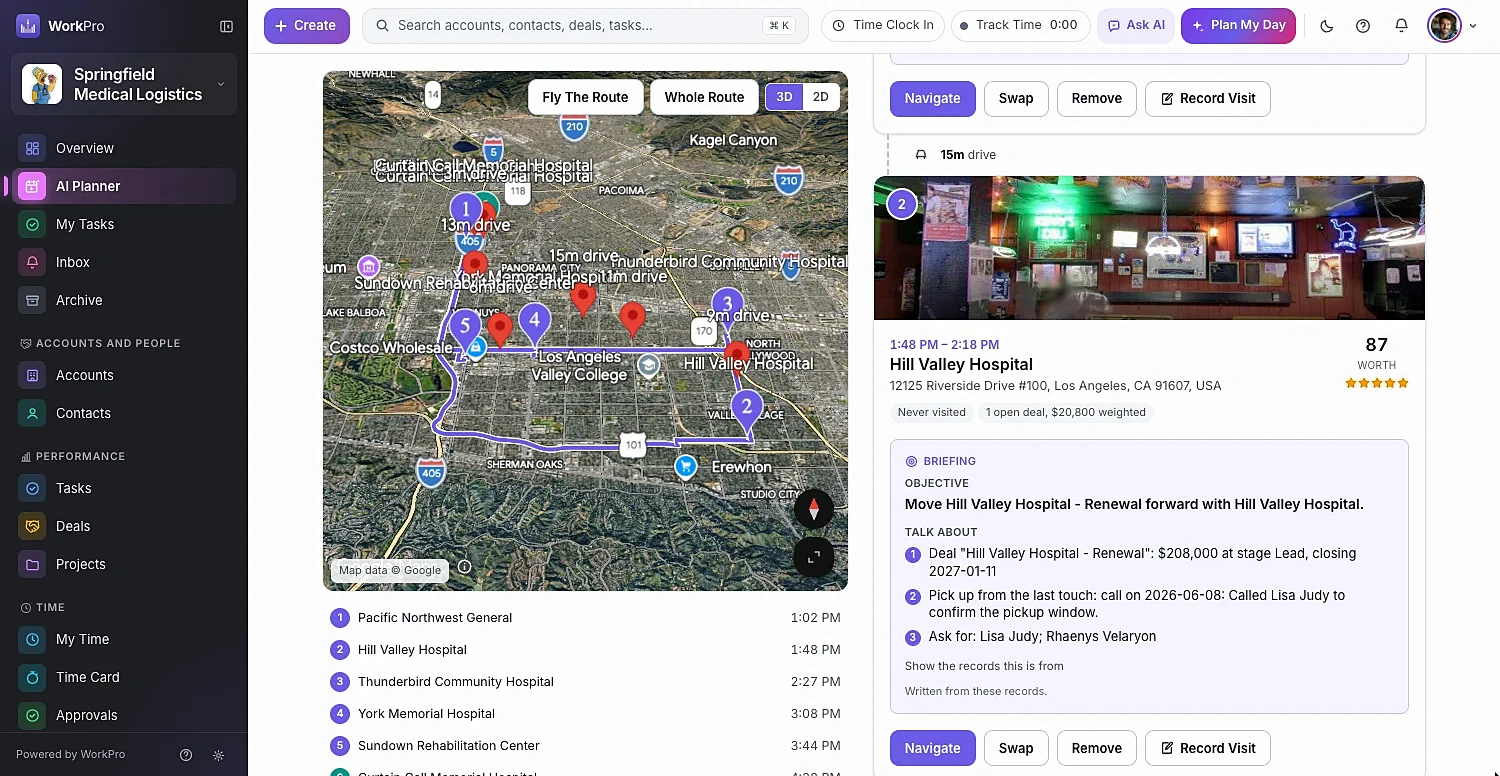
route flyover with Street View photos of every stop
3D
route flyover with Street View photos of every stop
code sends the route to Google Maps on your phone
QR
code sends the route to Google Maps on your phone
visit cadence by tier, with per-account overrides
Auto
visit cadence by tier, with per-account overrides

Who to visit

It knows who’s overdue, at risk or ready to buy

Set a visit cadence for each account tier — and override it per account. Plan My Visits weighs who’s overdue for a visit, who has open deals and who’s at risk, and gives each stop a Worth score so you can see why it made the list.

  • Only My Accounts, or the whole territory
  • Add must-visit accounts, contacts, deals or projects
  • Swap any stop for a suggested alternative
  • Start from the map: Visit Account on a pin, or Add All To Visits
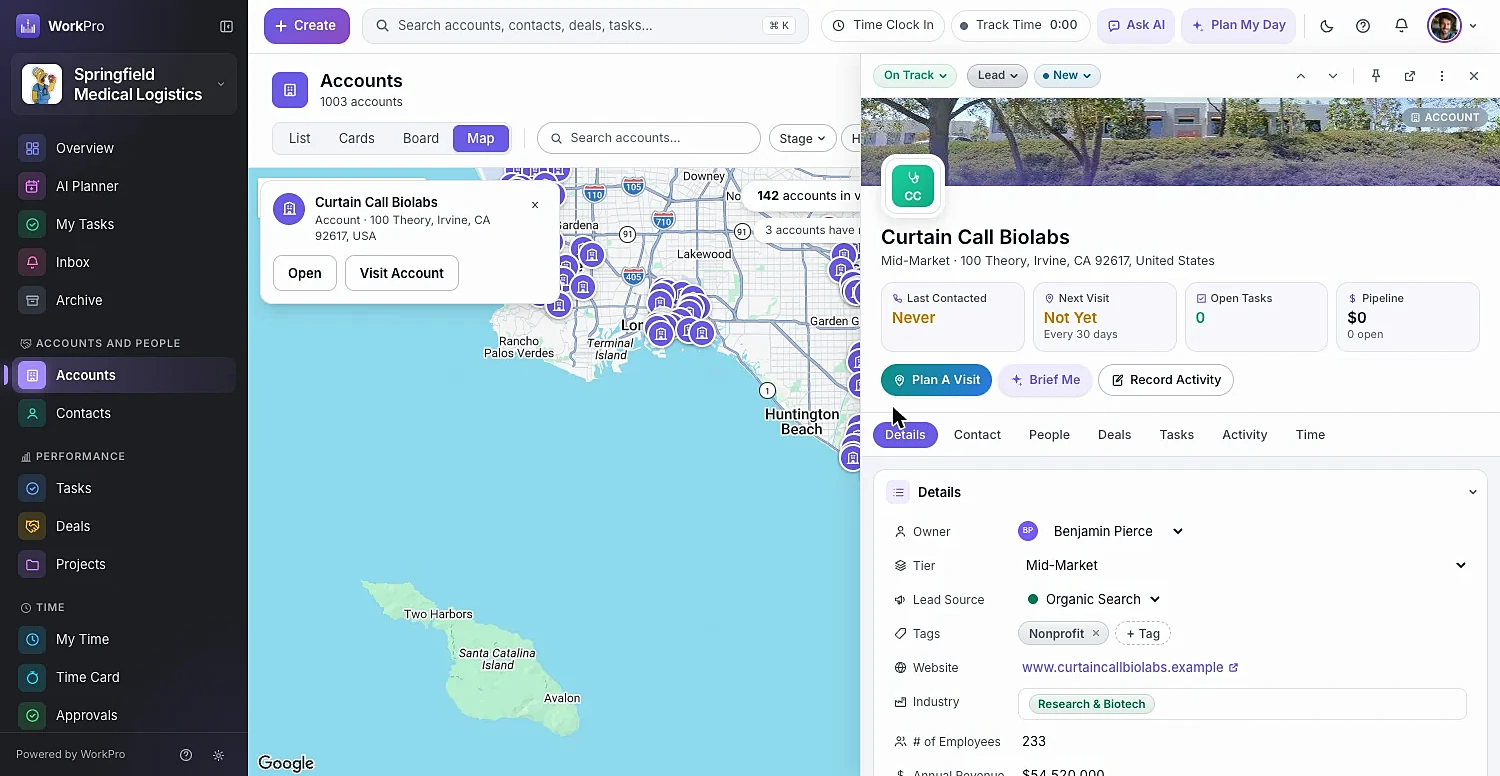
Accounts plotted on a map with one account open in the side pane

The route

A real day, not just dots on a map

Choose where you start and end — your location, an account or any address — how long you have, minutes per visit and customers’ visiting hours. Stop for lunch where you like, and include your calendar so meetings stay where they are.

  • Drive times between stops and a timed itinerary
  • View the route in 2D or 3D, or Fly The Route
  • Navigate to each stop, then Record Visit when you’re done
  • Save routes and reuse them
A planned visit route with numbered stops and drive times

Every stop briefed

Walk in knowing exactly what to talk about

Each stop comes with an AI briefing: the objective for the visit and what to talk about, drawn from the account’s deals, notes and recent activity. Need a refresher on any record? Brief Me gives you one on the spot.

  • Objective and Talk About for every stop
  • Street View photo so you recognize the building
  • Brief Me and Plan A Visit buttons on any record
  • Log the visit — with distance driven — by voice with Ask AI

On the road

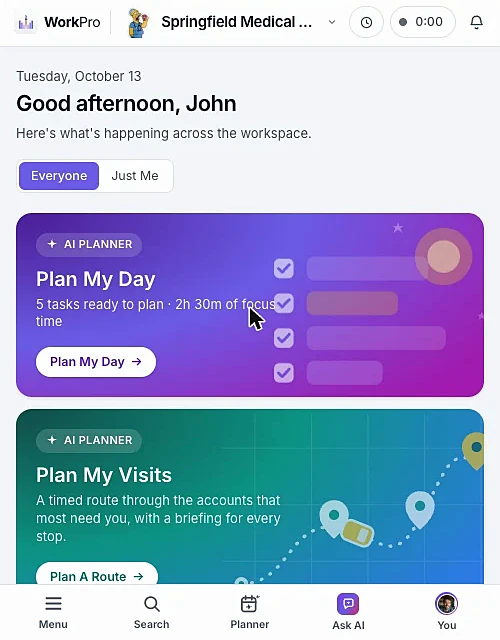
Built for the phone in your pocket

WorkPro runs in your phone’s browser — add it to your home screen and it opens full-screen like an app. Send any route to your phone with a QR code that opens it in Google Maps, share it with a teammate, or email the itinerary.

  • To Your Phone via QR code, straight into Google Maps
  • Share With Teammates — they get a notification
  • Copy the itinerary or email it
  • Call and email with your phone’s own apps
WorkPro on a phone showing Plan My Day and Plan My Visits cards

Capabilities

Everything a field team needs between visits

  • Territory map

    Accounts, contacts, deals and projects plotted with clusters — filters still apply.

  • Visit cadence

    Days between visits per tier, with a Visit Every override on any account.

  • Mileage on visits

    Visits record distance driven, ready for billing at your mileage rate.

  • Customer visiting hours

    Routes respect when customers can actually see you.

  • Shared routes

    Send a planned route to a teammate with a “Shared With You” notification.

  • Voice logging

    Log the visit by voice the moment you’re back in the car.

  • To Fill In reminders

    Scheduled visits that have passed stay flagged until someone records the outcome.

  • Bill the visit

    Billable visits flow into Ready to Invoice with the rest of the work.

  • Nothing to install

    Add WorkPro to your home screen on any phone.

Better together

It all runs on the same records

Every WorkPro module shares your accounts, contacts and deals — so the work flows from one to the next.

FAQ

Route Planning questions

Straight answers about what WorkPro does today. Can’t find yours? Ask us during a demo.

How does WorkPro decide which accounts to visit?

Plan My Visits considers which accounts are overdue for a visit based on your visit cadence, which have open deals and which are at risk, and shows a Worth score for each stop. You can add must-visit stops and swap any stop for a suggested alternative.

Can I plan a route around my existing meetings?

Yes. Connect Google Calendar and tick Include My Calendar Events — events with an address become stops at their scheduled time, and the rest keep their time free.

Can I send the route to my phone?

Yes. Each route has a QR code that opens it in Google Maps on your phone. You can also share it with a teammate, email it, or copy the itinerary.

Does WorkPro track mileage?

Visits record the distance driven, and with Invoicing on, billable visits and mileage flow into Ready to Invoice at your chosen rate, in miles or kilometers.

Is route planning included in every plan?

Plan My Visits is part of the WorkPro AI module, which the WorkPro team turns on for your workspace. Book a demo to see it with your own accounts.

Run your whole business from one app

See WorkPro with your own pipeline, projects and invoices in a 30-minute walkthrough. We’ll help you import your data, too.